
University of Peshawar (UOP) GPA Calculator: 2026 Official Scale

University of Peshawar Smart GPA Converter & Eligibility Checker
PakStudentCalc
PAK STUDENT CALC University of Peshawar Smart GPA Converter & Eligibility Checker University of Peshawar (UoP) · Peshawar · 2026 Official Regulations

How to use: Select your degree → Enter semester GPAs & credit hours → Click Calculate for your full academic report & PDF export.

1
Select Degree Program
University of Peshawar (UoP) — 2026
💡 UoP Grading Scale (4.0 — Semester System Regulations 2010):
Grade A — Excellent: ≥85%=4.0  ·  84%=3.9, 83%=3.8, 82%=3.7, 81%=3.6, 80%=3.5
Grade B — Very Good: 79%=3.4, 78%=3.4, 77%=3.3, 76%=3.3, 75%=3.2, 74%=3.2, 73%=3.1, 72%=3.0
Grade C — Good: 71%=2.9, 70%=2.8, 69%=2.7, 68%=2.6, 67–66%=2.5, 65–64%=2.4, 63%=2.3, 62%=2.2, 61%=2.1, 60%=2.0
Grade D — Fair: 59%=1.9…50%=1.0  ·  F — Fail: <50%=0.0
CGPA = Total Quality Points ÷ Total Credit Hours. Min pass: 50% per paper.
2
Semester GPA & Credit Hours
Enter each completed semester (GPA 0–4.00, Credits 1–45)
Semester
GPA (0–4.00)
Credit Hrs
Del
3
Student Info (Optional)
Appears on PDF report
Calculating your report…

University of Peshawar is one of the oldest and most respected public universities in Khyber Pakhtunkhwa. Thousands of students pass through its departments every year  and every single one of them, at some point, needs to know their exact GPA standing.

But here is the problem most UoP students face: the UoP grading system uses a letter-based, credit-weighted 4-point scale that is not exactly intuitive to calculate by hand. A single wrong multiplication and your whole CGPA figure is off. That causes unnecessary stress especially when you are trying to figure out if you qualify for a scholarship, an MS programme, or a competitive job.

This free UoP GPA calculator at Pak Student Calc solves that problem completely. It is built around UoP’s official semester regulations and 4-point scale. Get your SGPA, CGPA, percentage equivalent, and full academic standing in one click  nothing to install, nothing to pay, no account needed.

UoP Grading System – Complete Grade Points Table

The University of Peshawar GPA system is built on a 4-point scale tied to percentage marks. Each letter grade maps to a fixed grade point value. Your final GPA is not a curve  it is a direct reflection of your percentage performance converted into the 4.0 framework used by HEC Pakistan.

Here is the complete UoP grading scale, drawn from UoP semester regulations:

Marks % ageValueGradeRemarks
85 and above4.0AExcellent
843.9BVery Good
833.8
823.7
813.6
803.5
793.4
783.4
773.3
763.3
753.2
743.2
733.1
723.0
712.9CGood
702.8
692.7
682.6
672.5
662.5
652.4
642.4
632.3
622.2
612.1
602.0
591.9DFair / Poor
581.8
571.7
561.6
551.5
541.4
531.3
521.2
511.1
501.0
49 and below0.0FFail

How to Use This University of Peshawar GPA Calculator

The tool mirrors the way UoP records academic performance semester by semester, credit hour by credit hour. Here is the complete walkthrough:

Choose Your Degree Programme

Begin by selecting your programme from the dropdown. The calculator covers undergraduate and postgraduate degrees offered at UoP  from BS programmes in sciences, arts, and social sciences to MA, MSc, MPhil, and PhD levels. Picking your programme loads the correct minimum CGPA benchmark and confirms which UoP grading scale applies to your degree level.

If you are unsure which programme category fits you, just match it to what appears on your UoP result notification or transcript header.

uop select your degree program

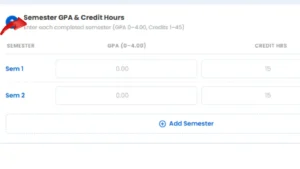
Add Your GPA and Credit Hours for Each Semester​

For each semester you have completed, add two numbers: your semester GPA and your total credit hours for that term. Use the “Add Semester” button to include all your semesters one by one. There is no limit add every term from your first semester right up to your most recent.

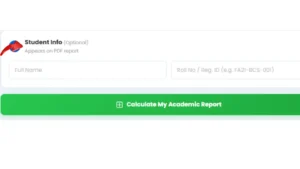
Before hitting calculate, you can enter your name and roll number in the Student Info section. This is optional but if you add it, your details appear on the PDF report, making it much more useful for advisors, scholarship applications, or academic counselling sessions.

enter semester gpa and credit hours

Click calculate to view results​

Press “Calculate My Academic Report” and everything appears at once:

enter student info bu optional

Save Your Academic Report as PDF​

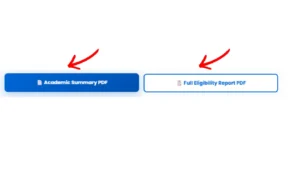
Two PDF formats are ready to download the moment results appear:

  1. Academic Summary PDF — a compact one-page report with your SGPA, CGPA, percentage, and standing — clean enough to hand to any advisor
  2. Full Eligibility Report PDF  the complete picture: job eligibility bands, graduate school thresholds, scholarship criteria, and a personalised improvement plan based on your numbers
download pdf report

UoP Percentage Conversion – Turning Your CGPA into a Percentage

Job applications in Pakistan, overseas university admissions, and many government forms ask for a percentage rather than a CGPA. The conversion standard used under HEC Pakistan guidelines is:

Percentage ≈ CGPA × 25

Example: A CGPA of 3.04 at UoP → 3.04 × 25 = 76%

This UoP percentage conversion is built directly into the calculator the figure shows up automatically with your results. For formal purposes like FPSC forms, foreign applications, or employer background checks, always use the percentage figure from your official UoP transcript. Any self-calculated number is an estimate, not an official record.