
NTU GPA Calculator: Calculate Faisalabad Campus CGPA Online

National Textile University Smart GPA Converter & Eligibility Checker
National Textile University (NTU) Faisalabad · Official Absolute Grading Scale
How to use: Select your program → Enter semester GPAs & credit hours → Click Calculate for your full NTU academic report & PDF export.

Ask any student at National Textile University (NTU) Faisalabad what stresses them most about the semester system, and “figuring out my CGPA” is somewhere near the top of the list. And honestly? It makes sense. Between credit hours, quality points, and academic probation thresholds, the GPA calculation at NTU involves more moving parts than most students realise.
This free NTU GPA calculator at Pak Student Calc is purpose-built for NTU students. It follows NTU’s official academic rules and regulations the same document that controls your standing, your scholarship eligibility, and your graduation requirements. Type in your semester data, get your SGPA and CGPA instantly, check your academic health, and walk away with a downloadable report. No spreadsheet. No manual math. No stress.
NTU Grading System – Official Grade Points Table
NTU Faisalabad uses an absolute grading system on a 4.0 scale, consistent with HEC Pakistan’s national framework. Absolute grading means your letter grade comes from your actual percentage score not from where you rank in the class. Score 85% in an exam and you get an A regardless of how anyone else performed.
Here is the complete NTU grade points table as per NTU’s academic rules and regulations:
Grading Criteria Approved by Academic Council
| Marks % | Grade Point | Letter Grade | Remarks |
|---|---|---|---|
| 90 and above | 4.00 | A+ | Exceptional |
| 85-89.9 | 4.00 | A | Outstanding |
| 80-84.9 | 3.66 | A- | Excellent |
| 75-79.9 | 3.33 | B+ | Very Good |
| 71-74.9 | 3.00 | B | Good |
| 68-70.9 | 2.66 | B- | Good Above |
| 64-67.9 | 2.33 | C+ | Average |
| 61-63.9 | 2.00 | C | Satisfactory |
| 58-60.9 | 1.66 | C- | Pass |
| 54-57.9 | 1.33 | D+ | Low Pass |
| 50-53.9 | 1.00 | D | Marginal Pass |
| Below 50 | 0.00 | F | Fail |

Easy Steps to Running the NTU GPA Calculator
The tool is designed around how NTU actually records your progress semester by semester, weighted by credit hours. Here is how to get your results in under two minutes.
Select Your NTU Programme
The first thing you do is pick your degree from the dropdown menu. NTU Faisalabad runs a broad range of programmes Textile Engineering, Polymer Engineering, Computer Science, Software Engineering, Artificial Intelligence, Fashion Design, BBA, MBA, MS, and PhD across four schools. Selecting your programme tells the calculator which minimum CGPA benchmark to check you against and confirms the grading scale that applies to your level.

Enter Semester's GPA and Credit Hours
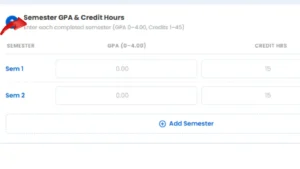
For every semester you have completed, enter two values: your semester GPA and the total credit hours you carried that term. Press “Add Semester” after each one to stack them. The tool does the weighted averaging across all semesters automatically.

Add Student Info (Optional but Useful)
There is an optional Student Info section where you can enter your full name and roll number. Skip it if you just want a quick result. But if you plan to download the PDF report and use it for academic advising, a scholarship application, or a graduate school inquiry, filling this in makes the document look professional and properly personalised.
Hit “Calculate My Academic Report” and your full academic picture loads up:

Calculate and Get Your Complete Academic Report
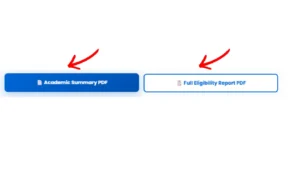
Two PDF reports are available for download right after:
- Academic Summary PDF a clean, one-page document with SGPA, CGPA, percentage, and standing ready to hand to any advisor or attach to an application
- Full Eligibility Report PDF the detailed version: job eligibility bands, graduate school thresholds, scholarship criteria, and your improvement roadmap

NTU CGPA to Percentage Conversion
When applying for jobs, government positions, or overseas graduate programmes, you will often be asked for a percentage. The standard conversion accepted under HEC Pakistan guidelines is:
Percentage ≈ CGPA × 25
Example: CGPA of 3.19 at NTU Faisalabad → 3.19 × 25 = 79.75%
This conversion is automatically calculated and shown in your results. For formal documents — FPSC applications, foreign university admissions, employer verification letters use the percentage shown on your official NTU transcript or a letter from the Registrar’s office. A self-calculated percentage is a useful estimate, but it carries no official weight on its own.